
This is a quick article on how to complete identity verification (KYC). You can always find current limits and options of the different verification levels directly in the Infinity Hash dashboard on the account page. Should you have any problems or questions, don’t hesitate to contact our support any time!
1) Go to the Account page
Log in to your Infinity Hash account. Click on the user icon on mobile or select “Account” in the sidebar if you are on desktop. This will bring you to the Account page, where you can see all available contracts.


2) Start your account verification
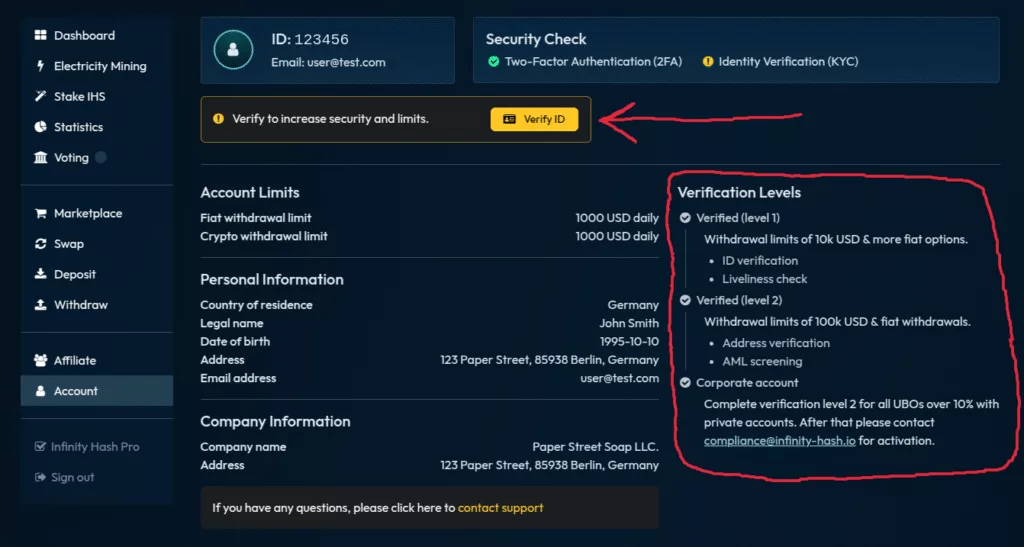
On the “Account” page, you’ll see your current limits and verification level. Verification levels are displayed on the right. To start your verification, click on the yellow “Verify ID” button and follow the instructions from our verification provider. You’ll only need a device with a camera and a valid ID document (passport, driver’s license, or ID card with image). Verification takes around 5 minutes.
3) Check your account verification status
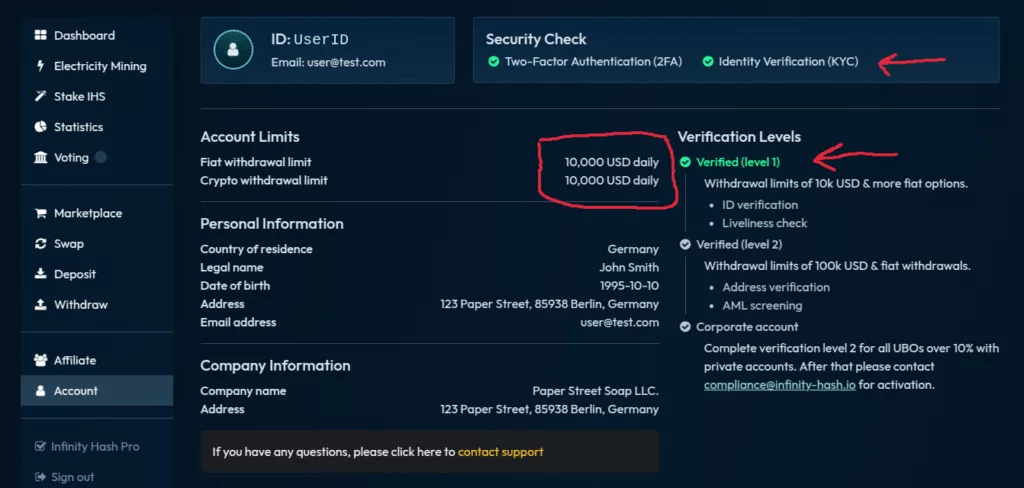
After verification goes through, you should see a green check mark on your security status and on the verification level you completed. Apart from this, you should also see your new withdrawal limits based on the verification level you completed.
PS: Should you have any problems, please don’t hesitate to contact our support!
